win7硬盘ntfs写保护怎么恢复解决
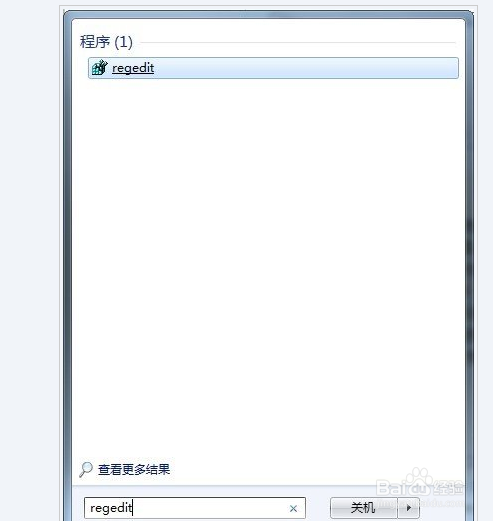
1、在开始菜单栏的搜索框输入“regedit”,打开注册表编辑器
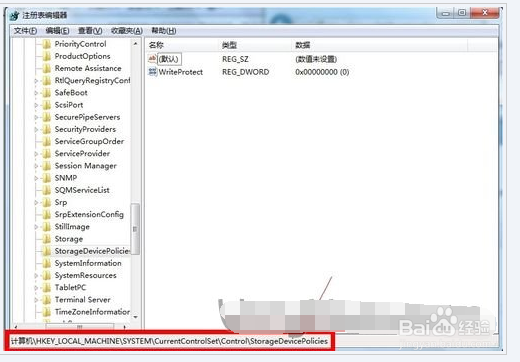
2、接着依次展开到HKEY_LOCAL_MACHINE\SYSTEM\CurrentControlSet\Control\StorageDevicePolicies项
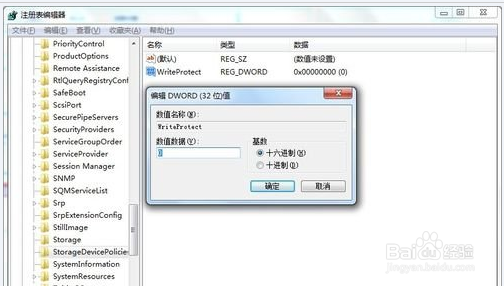
3、将右侧窗口中名为“WriteProtect”的键值改为“0”。
阅读量:151
阅读量:100
阅读量:142
阅读量:43
阅读量:126
1、在开始菜单栏的搜索框输入“regedit”,打开注册表编辑器
2、接着依次展开到HKEY_LOCAL_MACHINE\SYSTEM\CurrentControlSet\Control\StorageDevicePolicies项
3、将右侧窗口中名为“WriteProtect”的键值改为“0”。