指南经验网
首页
美食营养
生活百科
知识问答
生活知识
返回
指南经验网
首页
美食营养
游戏数码
手工爱好
生活知识
生活百科
健康养生
运动户外
职场理财
情感交际
母婴教育
时尚美容
知识问答
更多知识
搜索
vivo 手机如何关闭智能通知?
2026-05-12 19:09:50
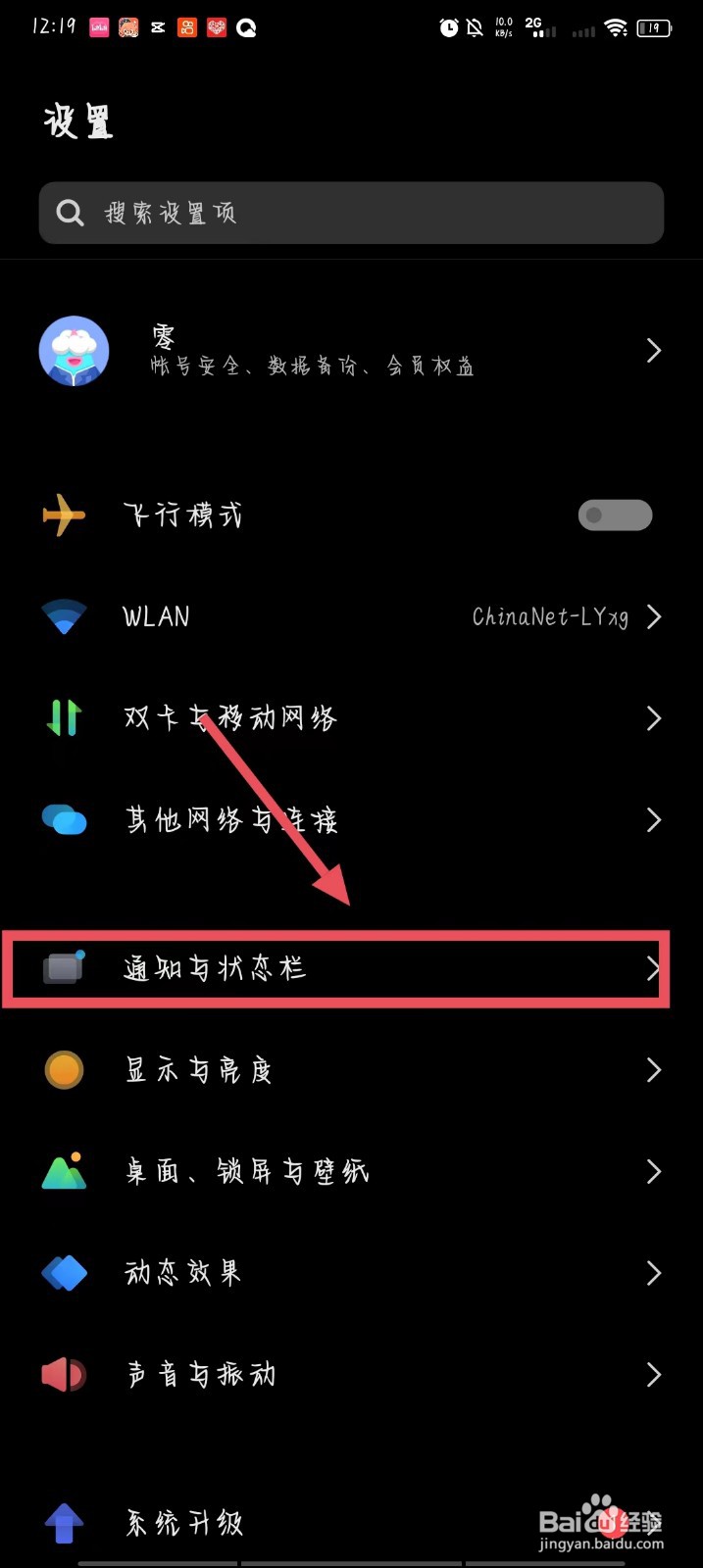
1、进入手机设置页面,点击【通知与状态栏】。
2、进入页面后,点击【智能通知】选项。
3、在跳转的页面中,将【智能通知】右侧的开关关闭即可。
相关推荐
vivo手机状态栏的通知图标太多,要怎么关闭呢
阅读量:179
vivo推送引擎可以去掉吗
阅读量:104
vivo智慧视觉怎么关闭个别软件
阅读量:163
vivo手机怎么自动填充验证码
阅读量:96
IQOO手机如何关闭“AI服务引擎”?
阅读量:187
猜你喜欢
家常菜菜谱大全
毛阿敏歌曲大全
宝宝小游戏大全
儿童图片大全可爱清新
衣服面料知识大全
安卓系统怎么刷机
日记300字大全初中
小孩起名大全
半命题作文题目大全
山东琴书大全
猜你喜欢
怎么删除手机自带软件
金瀚个人资料简介
古文字大全
感冒头疼怎么办最快最有效
海鱼的做法大全家常
爱情图片大全
芦荟怎么移植
河蚌的做法大全
游戏盒子大全
美女动态图片大全