FastStoneImageViewer如何允许使用文件标签
1、点击“FastStoneImageViewer”

2、在“FastStoneImageViewer”窗口中,点击“设置”
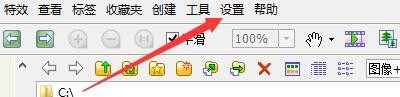
3、在弹出下拉栏中,再次点击“设置”

4、在“设置”窗口中,点击“缩略图”

5、在“缩略图”窗口中,勾选“允许使用文件标签”

6、点击“确定”即可

阅读量:78
阅读量:158
阅读量:59
阅读量:126
阅读量:165
1、点击“FastStoneImageViewer”
2、在“FastStoneImageViewer”窗口中,点击“设置”
3、在弹出下拉栏中,再次点击“设置”
4、在“设置”窗口中,点击“缩略图”
5、在“缩略图”窗口中,勾选“允许使用文件标签”
6、点击“确定”即可