快捷方式小箭头怎么去掉
1、按下快捷方式WIN+R,打开运行窗口。
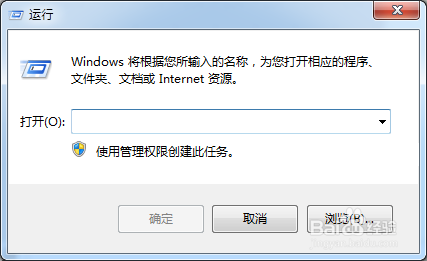
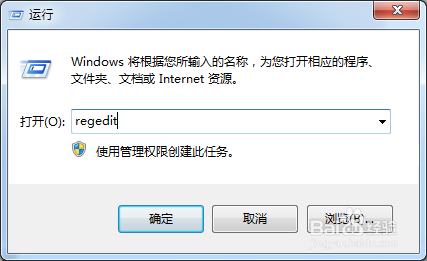
2、输入regedit,打开注册表。
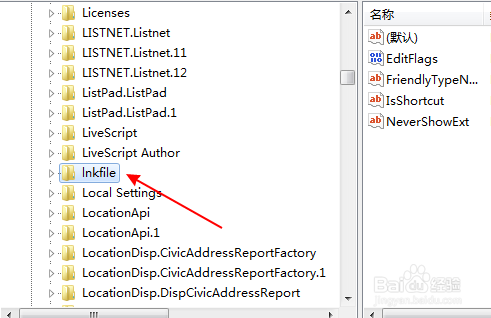
3、依次展开注册表列表:HKEY_CLASSES_ROOT——》lnkfile
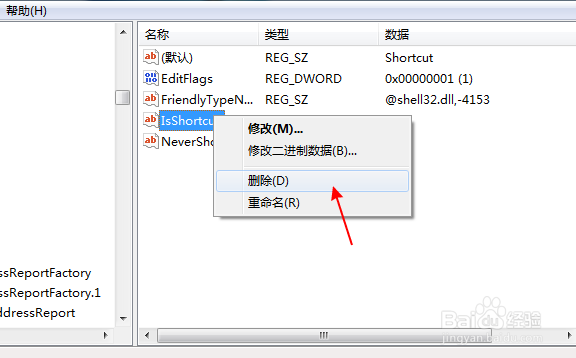
4、在右侧框中右击IsShortcut项,选择“删除”
1、在桌面上右键新建一个文本文档。

2、打开文档,复制以下内容:
reg add "HKEY_LOCAL_MACHINE\SOFTWARE\Microsoft\Windows\CurrentVersion\Explorer\Shell Icons" /v 29 /d "%systemroot%\system32\imageres.dll,196" /t reg_sz /f
taskkill /f /im explorer.exe
attrib -s -r -h "%userprofile%\AppData\Local\iconcache.db"
del "%userprofile%\AppData\Local\iconcache.db" /f /q
start explorer

3、保存文件,再把文件扩展名重命名为bat,直接运行。

阅读量:164
阅读量:112
阅读量:90
阅读量:21
阅读量:116