指南经验网
首页
美食营养
生活百科
知识问答
生活知识
返回
指南经验网
首页
美食营养
游戏数码
手工爱好
生活知识
生活百科
健康养生
运动户外
职场理财
情感交际
母婴教育
时尚美容
知识问答
更多知识
搜索
ps怎么画双向箭头
2026-04-28 10:44:45
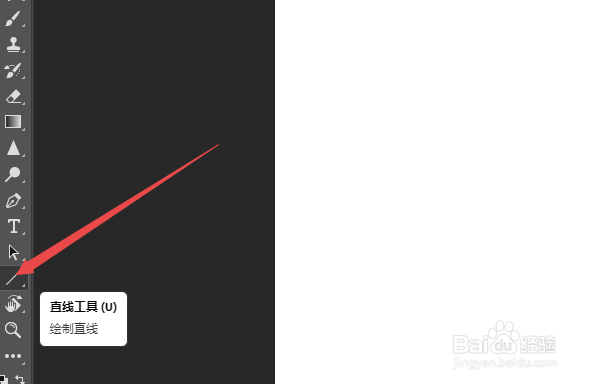
1、ps软件中,选择直线工具。
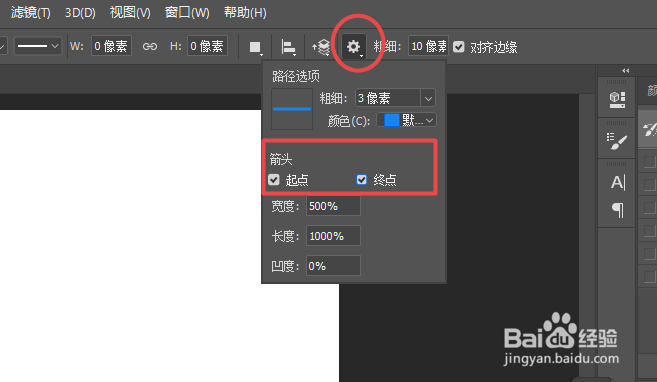
2、在顶部属性栏中,点击设置图标之后,勾选箭头下的“起点”和“终点”。
3、在画布上绘制出来的就是双向箭头了。
相关推荐
ps怎么画箭头
阅读量:190
用ps怎么给图片加箭头
阅读量:45
怎么用PS画箭头
阅读量:93
ps怎么画箭头指引线
阅读量:101
如何在PS中插入箭头图标?
阅读量:114
猜你喜欢
羊肉饺子馅怎么做好吃
王菲的歌曲大全
枇杷叶怎么煮水
怎么才能让眼睛变大
手语歌曲大全
怎么消除眼部皱纹
人生图片大全
榨汁机食谱大全
科学小发明怎么做
兰州中山桥简介
猜你喜欢
小学语文基础知识大全
excel公式大全
上课注意力不集中怎么办
心情图片大全
大白菜做法大全家常
大树简笔画图片大全
冰龙王怎么获得
珍惜时间的名言大全
锦鲤鱼图片大全大图
潍坊科技学院怎么样