如何在FastStoneViewer程序中按Esc键停止播放
1、点击“FastStoneImageViewer”

2、在“FastStoneImageViewer”窗口中,点击“设置”

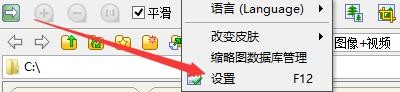
3、在弹出下拉栏中,再次点击“设置”
4、在“设置”窗口中,点击“视频文件”

5、在“视频文件”窗口中,勾选“按Esc键停止播放”

6、点击“确定”即可

阅读量:59
阅读量:121
阅读量:101
阅读量:109
阅读量:36
1、点击“FastStoneImageViewer”
2、在“FastStoneImageViewer”窗口中,点击“设置”
3、在弹出下拉栏中,再次点击“设置”
4、在“设置”窗口中,点击“视频文件”
5、在“视频文件”窗口中,勾选“按Esc键停止播放”
6、点击“确定”即可