指南经验网
首页
美食营养
生活百科
知识问答
生活知识
返回
指南经验网
首页
美食营养
游戏数码
手工爱好
生活知识
生活百科
健康养生
运动户外
职场理财
情感交际
母婴教育
时尚美容
知识问答
更多知识
搜索
ps怎么取消智能对象
2026-05-06 06:44:31
1、
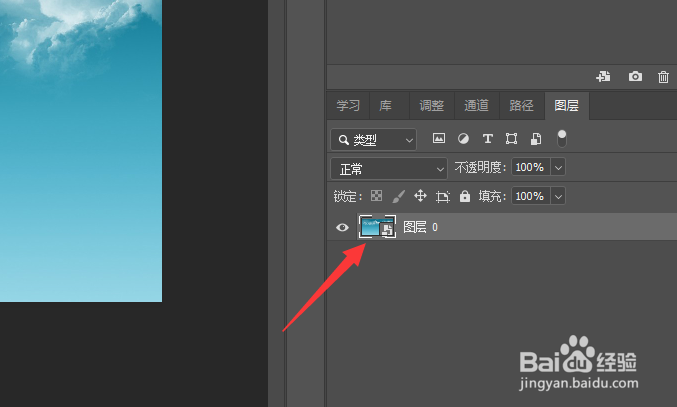
选择图层
ps软件中,选中智能对象图层。
2、
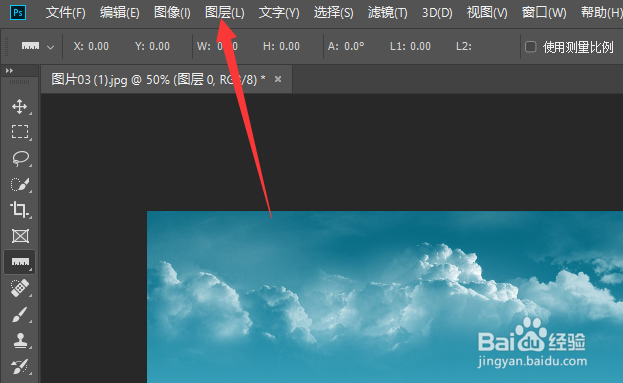
点击图层
点击菜单栏“图层”选项。
3、
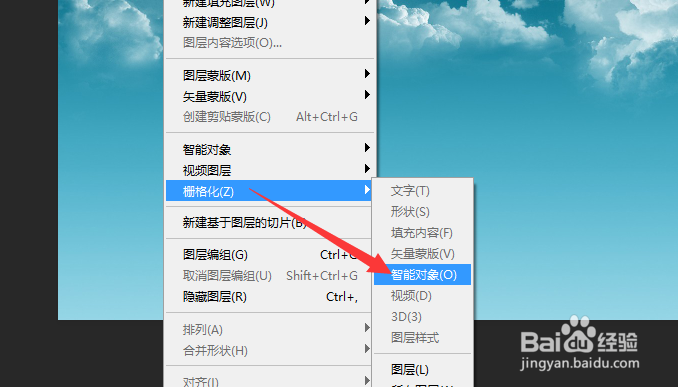
栅格化智能对象
在打开的列表选项中,选择“栅格化——智能对象”即可。
相关推荐
ps镜像翻转
阅读量:99
Photoshop怎么旋转选区?
阅读量:66
ps蒙版工具怎么用
阅读量:162
在PS中怎样给选区填充颜色
阅读量:147
ps怎么取消选区
阅读量:149
猜你喜欢
牙周病怎么治疗
手机怎么连接电脑上网
中国劳动关系学院怎么样
怎么让手指变细变长
减肥精油
青岛旅游攻略
高中生减肥
养生减肥
红烧鸡爪的做法
上里古镇旅游攻略
猜你喜欢
爬楼梯能减肥吗
微信怎么群发链接
手机蓝屏怎么办
怎么更换浏览器
屏幕录像专家怎么用
绾青丝简介
扬州旅游攻略
晚间西红柿减肥法
猎豹q6怎么样
云南自驾游攻略