指南经验网
首页
美食营养
生活百科
知识问答
生活知识
返回
指南经验网
首页
美食营养
游戏数码
手工爱好
生活知识
生活百科
健康养生
运动户外
职场理财
情感交际
母婴教育
时尚美容
知识问答
更多知识
搜索
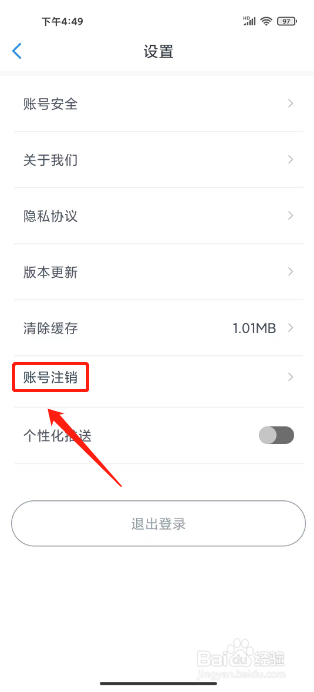
智慧仙桃怎么注销账号
2026-05-01 21:43:26
1、进入智慧仙桃app我的,点击【设置图标】。
2、进入设置,点击【账号注销】。
3、进入账号注销,点击【确定】。
相关推荐
智慧树如何注销账号
阅读量:34
智慧仙桃app怎样充值电子卡余额
阅读量:140
怎么注销智慧人社账号
阅读量:141
智慧仙桃app怎样充值电子卡余额?
阅读量:175
智慧仙桃app怎样提交意见反馈
阅读量:166
猜你喜欢
带状疱疹怎么治疗
觑怎么读
烤翅的做法
炒牛肉的家常做法
棒子骨汤的做法
微信怎么发朋友圈
油爆虾的做法
人参鸡汤的做法
莲菜饺子馅的做法
莜面的做法大全
猜你喜欢
word怎么删除空白页
白萝卜的做法大全
晨勃是怎么回事
笋怎么做好吃
东北乱炖的家常做法
孕妇食谱大全及做法
牛奶布丁的做法
披萨怎么做家庭做法
油麦菜的做法
鱼头汤的家常做法