windows10怎么连接蓝牙设备
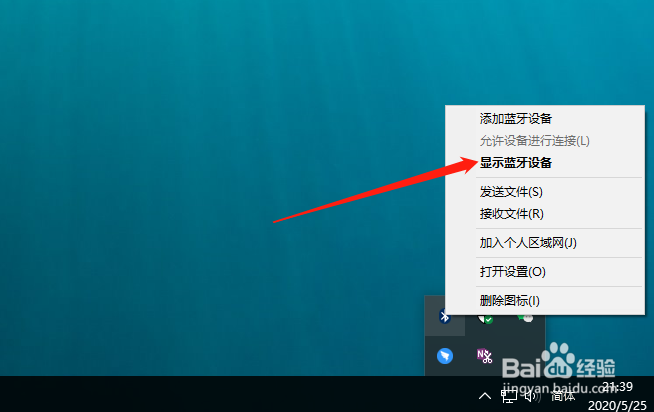
1、查到右下角的蓝牙图标。

2、点击,并选择显示蓝牙设备。
3、在打开的界面找到你要连接的蓝设备。
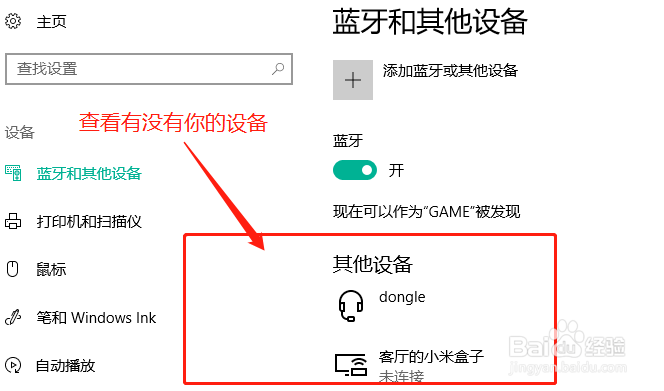
4、找不到,则点击上面的添加按钮。

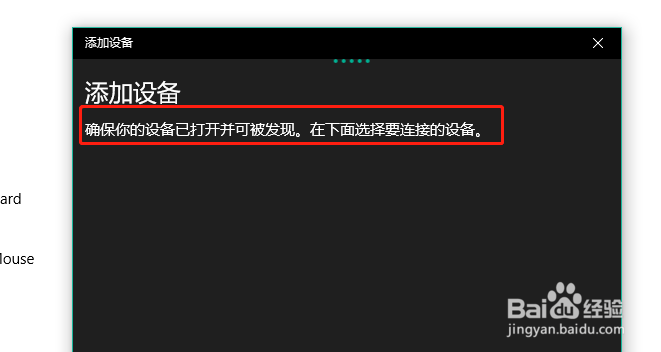
5、选择蓝牙选项。

6、在系统搜索完后,选择你要添加的设备。
阅读量:44
阅读量:170
阅读量:143
阅读量:192
阅读量:137
1、查到右下角的蓝牙图标。
2、点击,并选择显示蓝牙设备。
3、在打开的界面找到你要连接的蓝设备。
4、找不到,则点击上面的添加按钮。
5、选择蓝牙选项。
6、在系统搜索完后,选择你要添加的设备。