指南经验网
首页
美食营养
生活百科
知识问答
生活知识
返回
指南经验网
首页
美食营养
游戏数码
手工爱好
生活知识
生活百科
健康养生
运动户外
职场理财
情感交际
母婴教育
时尚美容
知识问答
更多知识
搜索
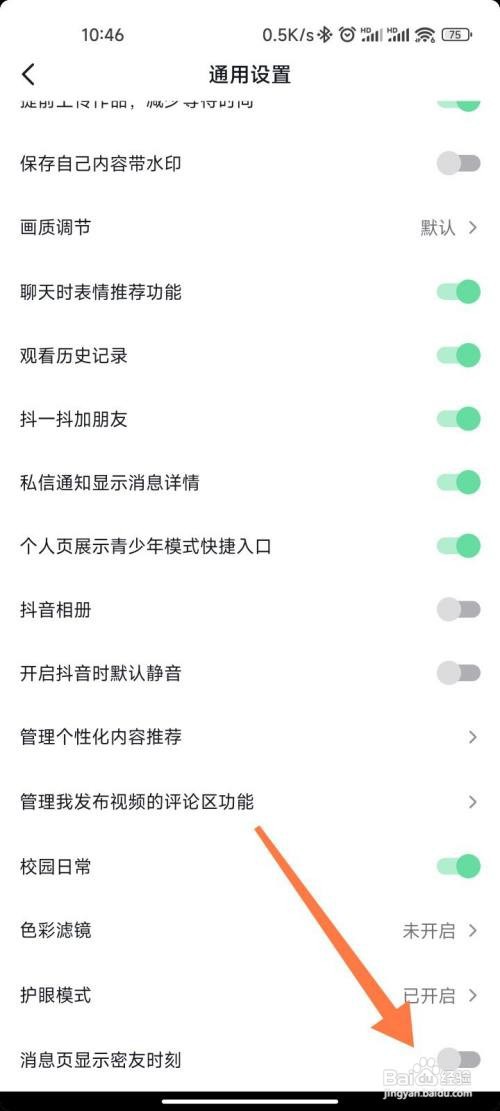
抖音如何关闭密友时刻
2026-04-24 12:07:34
1、在抖音我页面上方点击【三】后点击【设置】。
2、进入设置页点击【通用设置】。
3、在通用设置中点击关闭【消息页显示密友时刻】。
相关推荐
抖音密友时刻怎么解除密友
阅读量:134
抖音喜欢的视频如何隐藏
阅读量:102
抖音APP如何不让指定对象查看我的作品?
阅读量:112
抖音在哪里查看黑名单
阅读量:42
苹果手机如何设置为隐私账号
阅读量:83
猜你喜欢
不举是什么意思
蟾宫折桂的意思
什么叫ipo
崩溃是什么意思
悔恨的意思
后生可畏的意思
加内存条要注意什么
孕妇能用什么护肤品
小脸适合什么发型
充耳不闻的意思
猜你喜欢
滞留的意思
兴致勃勃的意思
名花有主什么意思
淘宝客是什么意思
bring是什么意思
送什么礼物给男朋友
垂涎的意思
过犹不及的意思
自重是什么意思
普天同庆是什么意思