Crimson editor怎么关闭使用空格代替制表符
1、点击Crimson editor菜单中tools

2、弹出了下拉菜单选中preferences选项

3、点击左侧中general选项

4、去掉use spaces in place of tab选项勾选
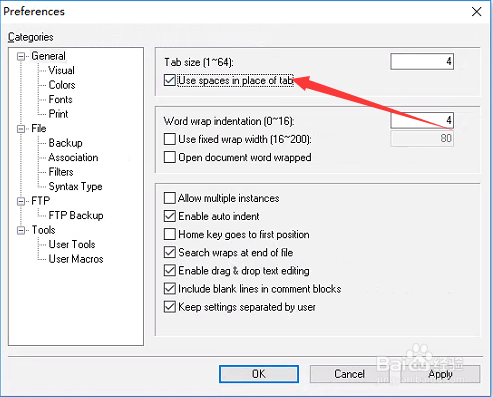
5、去掉use spaces in place of tab选项勾选之后,点击ok

阅读量:87
阅读量:21
阅读量:97
阅读量:182
阅读量:140
1、点击Crimson editor菜单中tools
2、弹出了下拉菜单选中preferences选项
3、点击左侧中general选项
4、去掉use spaces in place of tab选项勾选
5、去掉use spaces in place of tab选项勾选之后,点击ok