指南经验网
首页
美食营养
生活百科
知识问答
生活知识
返回
指南经验网
首页
美食营养
游戏数码
手工爱好
生活知识
生活百科
健康养生
运动户外
职场理财
情感交际
母婴教育
时尚美容
知识问答
更多知识
搜索
opporeno6pro+怎么启用智能侧边栏
2026-04-25 04:38:05
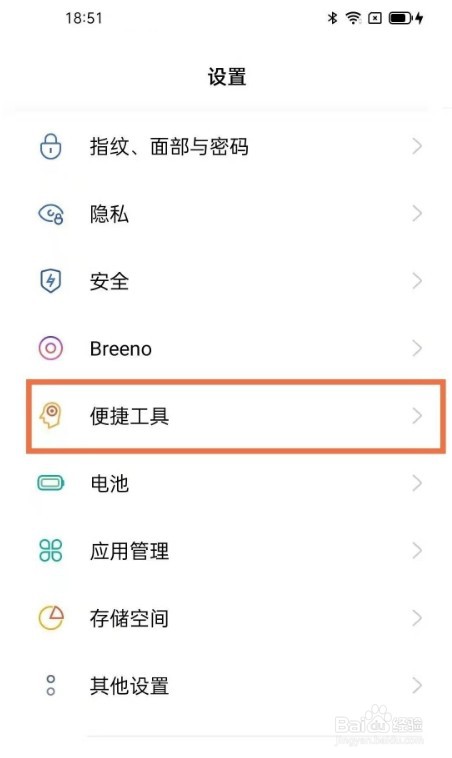
1、第一步,打开手机设置,点击【便捷工具】。
2、第二步,选择【智能侧边栏】。
3、第三步,开启【智能侧边栏】的开关即可。
相关推荐
oppo手机下载软件怎么桌面上找不到
阅读量:156
oppo手机应用隐藏了怎么找出来
阅读量:59
oppo手机隐藏桌面图标怎么找出来
阅读量:165
微信无应用界面怎么恢复
阅读量:139
oppo手机桌面图标不见了怎么恢复
阅读量:61
猜你喜欢
w10怎么还原w7
缙云旅游
小孩眨眼睛怎么回事
斯巴鲁傲虎怎么样
浙江工业大学之江学院怎么样
张家界旅游报价
胶水粘到手怎么办
自贡旅游景点
丹江口旅游
夫妻分居多长时间可以自动离婚
猜你喜欢
蛋清可以做什么
石林旅游
笔记本触摸板怎么用
沂蒙山旅游
水表怎么看的
衡水旅游
win7怎么定时关机
稻城亚丁景区
怎么下载种子
可以的英文