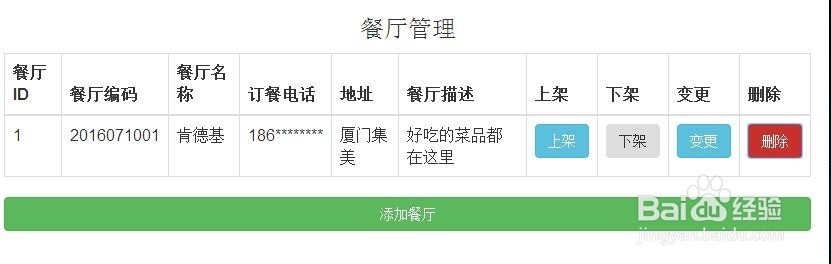
用bootstrap做一个简单而美美的页面
1、新建一个文本文档
2、将下面这段代码复制到刚才新建的文本文件中并保存
<%@ page language="java" import="java.util.*" pageEncoding="UTF-8"%>
<!DOCTYPE html>
<html>
<head>
<title>餐厅管理</title>
<style type='text/css'>
body {
background-color: #CCC;
}
</style>
<link
href="http://apps.bdimg.com/libs/bootstrap/3.3.0/css/bootstrap.min.css"
rel="stylesheet">
<script src="http://apps.bdimg.com/libs/jquery/2.0.0/jquery.min.js"></script>
<script
src="http://apps.bdimg.com/libs/bootstrap/3.3.0/js/bootstrap.min.js"></script>
</head>
<body>
<div>
<div>
<div>
<h3>餐厅管理</h3>
</div>
</div>
</div>
<div>
<div>
<div>
<table class="table table-bordered">
<thead>
<tr>
<th>餐厅ID</th>
<th>餐厅编码</th>
<th>餐厅名称</th>
<th>订餐电话</th>
<th>地址</th>
<th>餐厅描述</th>
<th>上架</th>
<th>下架</th>
<th>变更</th>
<th>删除</th>
</tr>
</thead>
<tbody>
<tr>
<td>1</td>
<td>2016071001</td>
<td>肯德基</td>
<td>186********</td>
<td>厦门集美</td>
<td>好吃的菜品都在这里</td>
<td>
<button class="btn btn-block btn-info" type="button">上架</button>
</td>
<td>
<button class="btn btn-block btn-inverse" type="button">下架</button>
</td>
<td>
<button class="btn btn-block btn-info" type="button">变更</button>
</td>
<td>
<button class="btn btn-block btn-danger" type="button">删除</button>
</td>
</tr>
</tbody>
</table>
<button class="btn btn-block btn-success btn-large" type="button">添加餐厅</button>
</div>
</div>
</div>
</body>
</html>
3、将文本文件后缀该为.html
4、双击用浏览器打开查看效果