指南经验网
首页
美食营养
生活百科
知识问答
生活知识
返回
指南经验网
首页
美食营养
游戏数码
手工爱好
生活知识
生活百科
健康养生
运动户外
职场理财
情感交际
母婴教育
时尚美容
知识问答
更多知识
搜索
钉钉职场精选怎么屏蔽
2026-04-26 17:21:34
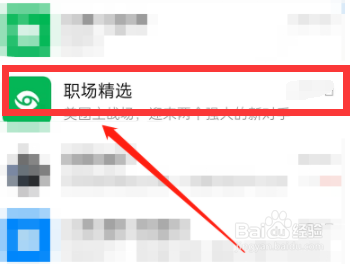
1、打开钉钉,
点击“职场精选”。
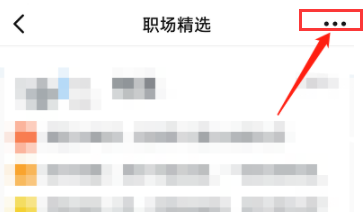
2、进入职场精选
,点击“三个小点”。
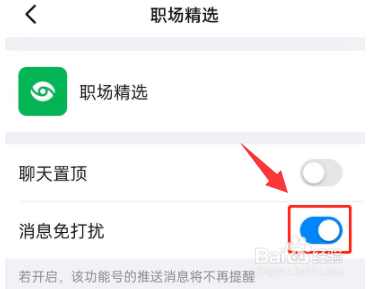
3、进入菜单,
将“消息免打扰”滑块开启
即可。
相关推荐
苹果11手机如何通过捷径给截图添加上边框?
阅读量:63
红心火龙果酸奶冻
阅读量:68
韩国泡菜的弊端
阅读量:121
生豌豆怎么储存
阅读量:45
刹车不灵的车叫什么车
阅读量:181
猜你喜欢
coc是什么意思
斩钉截铁是什么意思
什么是猥亵
垂青是什么意思
犬儒主义是什么意思
水木剧是什么意思
双引号是什么意思
高风亮节是什么意思
周一祝福语
女双鱼座和什么座最配
猜你喜欢
深沉是什么意思
融洽的意思
陋习的意思
胡子像什么比喻句
坐骨神经疼什么原因
一句美好的祝福语
加盟什么项目前景好
刮目相看是什么意思
有什么好看的动漫日本
大学预科班什么意思