指南经验网
首页
美食营养
生活百科
知识问答
生活知识
返回
指南经验网
首页
美食营养
游戏数码
手工爱好
生活知识
生活百科
健康养生
运动户外
职场理财
情感交际
母婴教育
时尚美容
知识问答
更多知识
搜索
ppt动画效果声音怎么关
2026-05-01 21:02:02
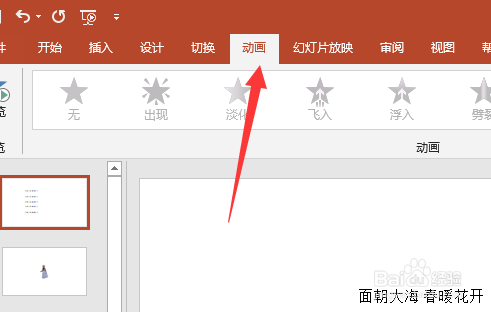
1、打开ppt,点击“动画”
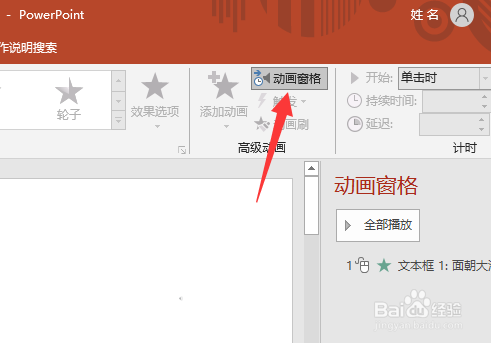
2、点击“动画窗格”
3、右侧动画窗格中,右击动画效果,点击“效果选项”
4、声音选择为“无声音”,点击“确定”即可
相关推荐
PPT2016怎么删除背景音乐
阅读量:128
ppt如何取消自动播放
阅读量:41
如何应对下属的压力
阅读量:75
wellpaying还是wellpaid
阅读量:63
旅行社如何做同业
阅读量:87
猜你喜欢
大话西游手游男鬼攻略
穿衣搭配网
寒山寺旅游攻略
我的世界胡萝卜怎么种
西游记简介100字
西游记简介50字
光遇攻略
吃减肥药会反弹吗
血象高是怎么引起的
怎么打印cad图纸
猜你喜欢
密室逃脱4攻略
重生之嫡女攻略
背后长痘痘怎么办
雷涛简介
减肥保健品
温碧泉的护肤品怎么样
河洛群侠传攻略
为了攻略病娇的边缘反复横跳
什么减肥效果好
苏打水减肥