指南经验网
首页
美食营养
生活百科
知识问答
生活知识
返回
指南经验网
首页
美食营养
游戏数码
手工爱好
生活知识
生活百科
健康养生
运动户外
职场理财
情感交际
母婴教育
时尚美容
知识问答
更多知识
搜索
iPhone怎么设置静音振动
2026-04-26 22:19:26
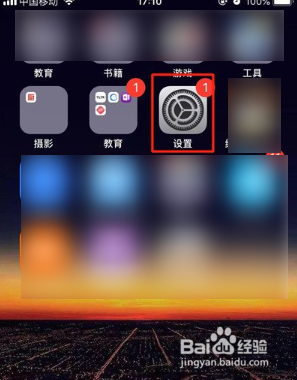
1、首先我们打开iPhone设置。
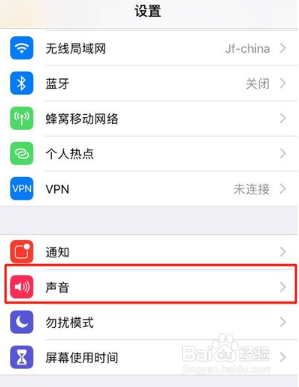
2、然后我们点击声音选项。
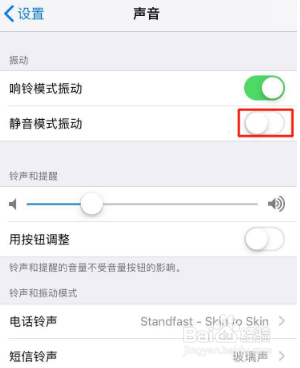
3、之后,我们开启静音模式振动右侧的开关即可。
相关推荐
苹果手机电池健康一直掉怎么办
阅读量:20
苹果13晚上连麦突然自动挂断怎么回事?
阅读量:189
iPhone13如何与家人定位共享位置
阅读量:184
手机天猫app怎么管理系统权限
阅读量:58
智慧好医院app怎么设置登录密码
阅读量:94
猜你喜欢
工作日志怎么写
收入证明怎么写
在我看来用英语怎么说
鬼剃头是怎么回事
鼻窦炎怎么治疗最好
乳腺脓肿怎么治疗
爱出汗是怎么回事
怎么才能快速减肥
北京妇产医院怎么样
地板革怎么铺
猜你喜欢
地方教育费附加怎么算
韩语不要怎么说
电脑怎么扫描二维码
怎么扫描文件
square怎么读
怎么写个人简历
怀疑老公有外遇怎么办
怎么办准生证
彩虹楼隐藏关怎么进
铁三角耳机怎么样